










Microsoft Office Professional 2021
Microsoft Office is the best set of productivity apps for serious office work. The new version is an incremental upgrade that adds speed and some ingenious convenience features but otherwise works almost exactly like earlier versions, so there’s no big learning curve for upgraders.
PROS
- Buy-once, use-forever version of Microsoft Office
- By far the most powerful office suite
- Includes access to web and mobile versions
- Cleaner interface with no new learning curve
CONS
- Microsoft Word’s automation features are intrusive and hard to control
- Outlook can seem bloated and unwieldy
- Some features are deeply hidden in obscure menus
Office 2021 is the latest version of Microsoft’s office suite that’s probably more widely used than all other desktop applications globally. The new iteration is faster and has some welcome additions—now shipping with Microsoft Teams and adding on-the-fly translation of foreign languages to Outlook, for example. Office 2021 is not a revolutionary change to the killer suite, but that’s okay. If you’ve used recent suite versions, you’ll find the 2021 version a comfortingly familiar experience with a low learning curve. Once you upgrade, you can get back to work quickly, yet you’ll also find enough new touches for it to be worth the money. Office 2021 is a clear Editors’ Choice winner for office suites.
How Much Does Office 2021 Cost?
Office 2021 costs $439.99, or $149.99 for students. The 2021 date in the name means that this is a perpetual license version that you buy once and use forever—or at least until you decide to upgrade.
Microsoft also offers Office as a subscription called Microsoft 365 (formerly Office 365), which requires you to pay for it by the month or year. When you buy the perpetual license version, you get security updates every few months, but you don’t get the monthly jolt of new features that Microsoft provides to subscribers. You also miss out on generous OneDrive online storage and other extras. If you’re a corporate IT manager or just don’t like subscriptions, you’ll prefer the perpetual-license version.
Here we cover Office Professional 2021 for Windows, but much of it applies equally to Office for Mac, which also now comes in a perpetual license version. If you’re already using Office apps through a Microsoft 365 subscription, you won’t find any surprises in Office 2021. If, however, you’re using an older perpetual-license version, such as Office 2019, Office 2016, or earlier versions, you’ll find new and mostly improved features that you may decide are worth having—more about those in a moment.
Some features formerly only available in Office’s browser-based version are now available in the desktop apps. For example, in the Office 2021 desktop apps, you can now coauthor documents in real time, complete with clear visual indicators of who else is collaborating on the document and where they’re making changes
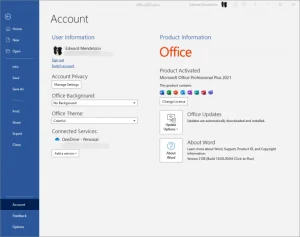
Except for the newly slotted-in features, Office 2021 looks mostly like the 2019 and 2016 versions. You don’t have to worry about learning a new interface.
What’s New in Office 2021?
If you’re upgrading from the 2019 version, here’s a list of the major new features. Keep mind that these will be new only if you’re coming from an earlier perpetual-license version. Microsoft 365 subscribers saw these features added gradually over the past two years.
- Excel has formulas that immediately return an array of values, a function that assigns names to the results of calculations so that you can use those names in a formula, a function that returns the relative position of an item in a range of cell, and customized views for individual sheets.
- PowerPoint lets you replay animations in which you apply freehand inking to a slide and adds a feature that lets you create a link to a specific slide and send the link to a colleague, with an option to let them edit it.
- Outlook gets on-the-fly translations, faster searches, freehand inking, and more.
- For the first time, Office ships with Microsoft Teams, Microsoft’s answer to Slack.
None of these new features are revolutionary. If you’re already running the 2016 or 2019 version, and you don’t really need these new 2021 improvements, you don’t need to spend money on the new version. If you’re setting up a new computer, however, and you don’t have an existing license for Office, then you won’t regret starting with the 2021 edition. If you’re upgrading from a previous version, keep in mind that Microsoft, unlike many other vendors, doesn’t offer reduced-price upgrades. You pay the same amount, whether you’re just starting out with Office or have been using it since the previous century.
How to Buy Office 2021
When you try to buy Office 2021, Microsoft makes it clear that it wants you to pay for a subscription to Microsoft 365, rather than buy a perpetual license. To find the option to buy a perpetual license, go to the Microsoft 365 page, select either “Personal and Family” or “Business,” depending on the version you want.
If you select Personal and Family, scroll down until you see a large comparison table. At the top right is an option to buy Office Home & Student 2021 as a one-time purchase for PC and Mac for $149.99. This version doesn’t include Outlook.
If you select Business, scroll all the way down until you see “Looking for Office as a one-time purchase? Compare products.” Choose that option, and you end up on a page that shows the perpetual license offer for $249.99.
I tested the high-end Office Professional 2021 version ($439.99), which adds Microsoft Publisher and Microsoft Access to the basic apps. You can buy this version directly from Microsoft or through third-party sites such as Amazon.
Microsoft also has a new LTSC (Long-Term Service Channel) version with fewer features, available only to volume-license purchasers, designed for corporations that don’t intend to upgrade their systems often.
Office 2021 went public on the same day that Microsoft released Windows 11 to the public, but you don’t need Windows 11 to run Office 2021. If you’re one of the relatively small number of users who needs to use 32-bit Windows because you have applications that won’t work in 64-bit versions, you’ll want to know that Office 2021 includes a 32-bit version, and the setup program will automatically install it on a 32-bit Windows system. Windows 11 only comes in a 64-bit version, but if you’re running 32-bit Windows 10, Microsoft will continue to support it until 2025.
You Know These Apps
It’s a certainty that a great many Microprokey readers already know their way around Microsoft Office, so we’re only taking a brief look at each of the major apps in the suite, and we’re keeping the emphasis on new features. For those who want deeper dives on the components, we’ll be writing full reviews of several of the bigger ones as we use them over the coming months.
Microsoft Word, the Wordsmith’s Choice
The most powerful word processor ever made gets easier to use with each new version. Word offers so many high-tech features that you may need to search for them—and fortunately, Word and the other apps now include a prominent feature-search field in the title bar. The new search bar also finds Help topics for any terms you enter. If, like most users, you can’t remember that the menus for editing headers and footers are on the Ribbon menu’s Insert tab, type Header into the feature-search field and Word will take you to the place in the Ribbon where you want to go.
There are some gaps, however. If you’re looking for the Master Document feature, which lets you build a large document from separately editable chapters, the feature-search field doesn’t find it unless you already know that you need to change the View setting from Print Layout to Outline first.

If you use a mouse, Word’s multiple-pane interface works beautifully: Just click in the Proofing pane and correct your spelling and grammar. But if you rely on the keyboard, it’s a real challenge to get to the Proofing pane and select the option you want. I still haven’t figured out how to use the keyboard to navigate the Proofing pane, as shown in the image below.

Such minor complaints aside, Word outclasses everything in competition in ways that benefit both beginners and advanced users. Beginners get to choose among thousands of elegant template designs downloadable directly from Word’s New menu. Advanced users get to use the most full-featured programming language in any word-processor, the same Visual Basic for Applications usable in Excel and PowerPoint. It’s not an easy language to learn, but anyone can learn the basics by recording a macro and then studying the resulting code in Word’s built-in Visual Basic editor. And if you can’t program Word to do what you want, you can probably find what you want in the many of macros others have posted online.
In a welcome nod to the trend toward distraction-free writing apps, Office 2021 adds a Focus mode for when you’re trying to concentrate on your work. Just click the Focus button on the toolbar at the foot of the window and switch instantly to a full-screen editing mode with no visible menus, only a scrollbar and buttons at the top that restore the normal window or close the file. If you have a two-monitor setup, Focus mode operates only in one monitor so you’ll need to power off your second monitor if you want no distractions at all.
Excel Excels
Excel has always outclassed every other spreadsheet app for speed and power, and that doesn’t change in the latest update. The 2021 version seems slightly faster than the 2019 version when you’re working with large, complex worksheets, but the major reason to get the new version is its expanded feature set.
An ingenious new XLOOKUP function makes it easy to display a value from a large array of data. For example, you may have a column that lists stock symbols and another column that lists current prices of the same stocks. You can go anywhere else in your worksheet and assign one cell as a cell where you can type in a stock symbol, and assign another cell as the one that will display the price of the stock you typed. (This second cell is the one where you create an XLOOKUP formula.)

A new dynamic array feature lets you create a formula in the first cell of a table that returns data from all the rows in the table, no matter how many rows it contains, so you don’t have to know in advance how many rows your table will contain. This feature extends a nifty and little-known feature from earlier versions that lets you start with two columns, one containing first names, the other containing last names, and automatically create a new column that combines the first and last names into full names.
One other notable new feature for shared workbooks makes it easy for you to create a custom sheet view that displays only the data you want to work with, while other people working on the same workbook at the same time can have their own custom views. In other words, you can display only one part of a data set while someone else working on the same sheet displays a different part. The screenshot below was taken on the macOS version, because, for reasons that I don’t understand, I couldn’t get the sheet view to appear on my Windows PC—a glitch that Microsoft hasn’t explained to me.
Get hints for mastering this massive app in our story, 26 Excel Tips for Becoming a Spreadsheet Pro.
 PowerPoint’s on Point
I already mentioned presentation powerhouse PowerPoint’s new ability to record your freehand inking for playback later. PowerPoint adds a few other convenience features, like the ability to record a slideshow and save it as a video file.
New to PowerPoint or looking to level up you prowess? Try our 6 Tips for Creating Great PowerPoint Presentations Fast.
Outlook: Rich With Features or Bloated?
Outlook is a mature app—some users find it more bloated with features than it needs to be—and it hasn’t changed much in the new version. When you type a search term into the new search field, a new tab appears on the ribbon that lets you narrow your search to specific senders, recipients, and other criteria.
The new Translator for Outlook add-in converts text among over 70 languages. And touch-screen users can mark up emails with digital ink.

Installation: Easy or Near-Impossible
If you’re using an older, non-subscription version of Office, you may see a pop-up offering you the chance to try or buy the new version. If you follow the prompts, you can install the upgrade easily. And if you already have a non-subscription version, you can upgrade easily from the Microsoft Store.
Microsoft doesn’t remove the older version when you install the new one, however, and your system can get confused over which version to use. It makes sense to uninstall the old version after installing the new one. Keep in mind that you may need to make a repair installation of the new version if you encounter problems after removing the old one.

If you’re trying to switch from a subscription-based Microsoft 365 installation to a perpetual license, expect to take a few extra steps. After you run the Office 2021 installer, open one of the Office apps, click on the File menu, then the Account tab, and look at Product Information. If it tells you that you’re using Office 365 or an earlier version of Office, click the Change License button. Then in the next dialog, if you’re already logged in to your Microsoft account and the email address of your account is displayed in the dialog box, click on Use a different account, and then find the very small type that says Enter a product key instead. Finally, you reach the dialog where you can enter your product key and activate Office 2021. If you’re not signed in to your Microsoft account, simply click the Change License button and find the link that says Enter a product key instead.
At least, that’s the way to make the switch from subscription-based Office to perpetual-license Office if all goes well. When I tried to make this switch on my test system, some Office apps kept reporting themselves as the Microsoft 365 versions. After I tried uninstalling Microsoft 365, Excel continued to insist that I had the 365 version. This problem is so common that Microsoft actually offers an Office uninstall support tool (search for it if you need it) that’s supposed to scrub away the 365 version.
Not even Microsoft’s scrubbing tool could clear out all traces of older versions and let me make a clean install of Office 2021. The only way I finally sorted everything out was by deleting all the Office-related folders in my Program Files and AppData folders and clearing out all the Office entries in the Windows Registry.
Alternatives to Office
Most of the alternatives to Office are less powerful or more annoying. The most popular rival products are the free Google Workspace (aka Google Docs), which operates only in a web browser or as a mobile app—with all the security risks that go with storing your documents in the cloud; and the free open-source LibreOffice, which operates only as a desktop application. Microsoft Office, in contrast, runs on a desktop, in a browser, and as a mobile app. A free Microsoft account gives you access to all three. You have to pay for Microsoft’s desktop apps—the online versions are free—but you don’t have to worry about accessing your documents when you’re offline, as you do with Google Docs. Office also gives you far more reliable and feature-packed apps than LibreOffice does. With Google’s apps, if you want to collaborate with colleagues, everyone has to access the documents on Google’s servers. With Microsoft Office, you can collaborate on documents stored on a Microsoft SharePoint Server, in a personal OneDrive folder, or on Dropbox.
Other alternatives worth considering are the many commercial Office work-alike desktop applications that cost less and also do less. We like Soft Maker Office 2021 (free for a limited version, $79.95 and up for the full-featured version), but you might also look into rival products like Kingsoft WPS Office (free for a limited version, $119.99 for a perpetual-license version, or $29.99 per year for a subscription), which we hope to review in the future. Only one major office suite doesn’t try to imitate the way Microsoft Word creates documents, and that’s Corel WordPerfect Office 2021 ($249.99), which, unlike all other current word processors, uses a reveal-codes screen that lets you see exactly how your document is formatted, giving you complete control over it. WordPerfect also makes it easy to perform some cleanup operations that are hopelessly tedious in Word, such as removing unneeded style settings that Word creates when you import data from other applications.
Of course, macOS users can use Apple’s iWork suite in desktop, iOS, or browser-based versions, with real-time collaboration available in all of them. If you use an Android device, Linux computer, or Windows PC, you’ll be able to edit Pages, Numbers, and Keynotes documents only in a web browser.
For anyone doing serious work on a Windows PC, Microsoft Office is close to indispensable. Students and home users can get along well enough with Google Docs, Sheets, and Slides, and anyone who needs to use open-source software for legal or other reasons can choose the buggier but no-cost LibreOffice. Mac users have Apple’s Pages, Numbers, and Keynote, but you need to export the documents in Office formats in order to share them with Windows or Linux users (unless you force them to use the iWork web apps, that is).
If you’re working in an Apple-only environment, then Keynote is the obvious choice among presentation apps. Apple’s Numbers is terrific for innovative-looking graphic intensive spreadsheets, and makes many features easier to use than Excel does, but, overall, Excel is far more powerful. Keep in mind, too, that you’ll probably need to export your Numbers worksheets to Excel format if you plan to share them. Microsoft Word is a mix of unique power and unique annoyances, but its file format is only one that you can exchange with almost anyone, no matter what operating system they use—including Linux, where LibreOffice can open and save in Microsoft formats.
Best for Stability and Reliability
We can’t tell you whether you’ll prefer a Microsoft 365 subscription or a perpetual license for Office 2021. If you value stability and don’t want to worry about losing access to your apps if a subscription runs out, definitely go for Office 2021. If you like the idea of a monthly helping of new features and need the latest and greatest—along with a terabyte of online storage for backup and syncing—then get the subscription version. Either way, we can’t imagine a work week without Microsoft Office, and probably you can’t either. Office 2021 is our clear Editors’ Choice winner for office apps, just as its predecessors have been.


